Floor Scrubber Brush Motor Not Working?
If your floor scrubber turns on but the brush motor is not working, the problem may be easier to fix than you think.
In many cases, the cause may be a loose or damaged wire, a blown fuse, a faulty contactor, or a malfunctioning brush micro switch.
Start with the quick checks below to identify the possible cause before replacing any parts.

QUICK CHECKS
Start With These Quick Checks Before replacing any parts, check these common causes first.
1. Make Sure the Brush Is Properly Installed
Check that the brush or pad driver is fully attached and locked into position.
An improperly installed brush may not engage correctly.
4. Turn the Machine Off and Check for Debris
Hair, string, plastic wrap, carpet fibers, and other debris can become wrapped around the brush, pad driver, or drive mechanism.
Turn the machine off before inspecting or removing debris.
2. Make Sure the Brush Deck Is Lowered
Some floor scrubbers will not operate the brush unless the brush deck is fully lowered into the operating position.
5. Check the Battery Level
A very low battery may prevent some machine functions from operating normally.
Fully charge the batteries and test the machine again.
If the brush still does not spin, continue with the troubleshooting steps below.
3. Check the Operating Controls
Make sure the machine is turned on and the brush function is properly engaged.
On some models, the brush will only spin when the drive paddle, handle switch, or accelerator pedal is activated.
STEP-BY-STEP TROUBLESHOOTING-CR21 Example
Complete each step before moving to the next one
First, empty the recovery tank and tilt the tank backward to access the area underneath. Using a flat-head screwdriver, remove the four screws securing the metal plate. Locate the brush motor wiring connector and check whether the connector is loose, disconnected, or damaged. If it is disconnected, reconnect it securely. If the connector or wiring is damaged, the wiring connector should be replaced. Remove the protective ring around the connector before testing the voltage.
Set the multimeter to DC voltage (V⎓). Turn on the key switch and activate the brush function, then measure the voltage at the brush motor connector. If the connector has battery-level voltage but the brush motor does not operate, the brush motor is likely damaged and should be replaced. If there is no voltage, continue to Step 3.
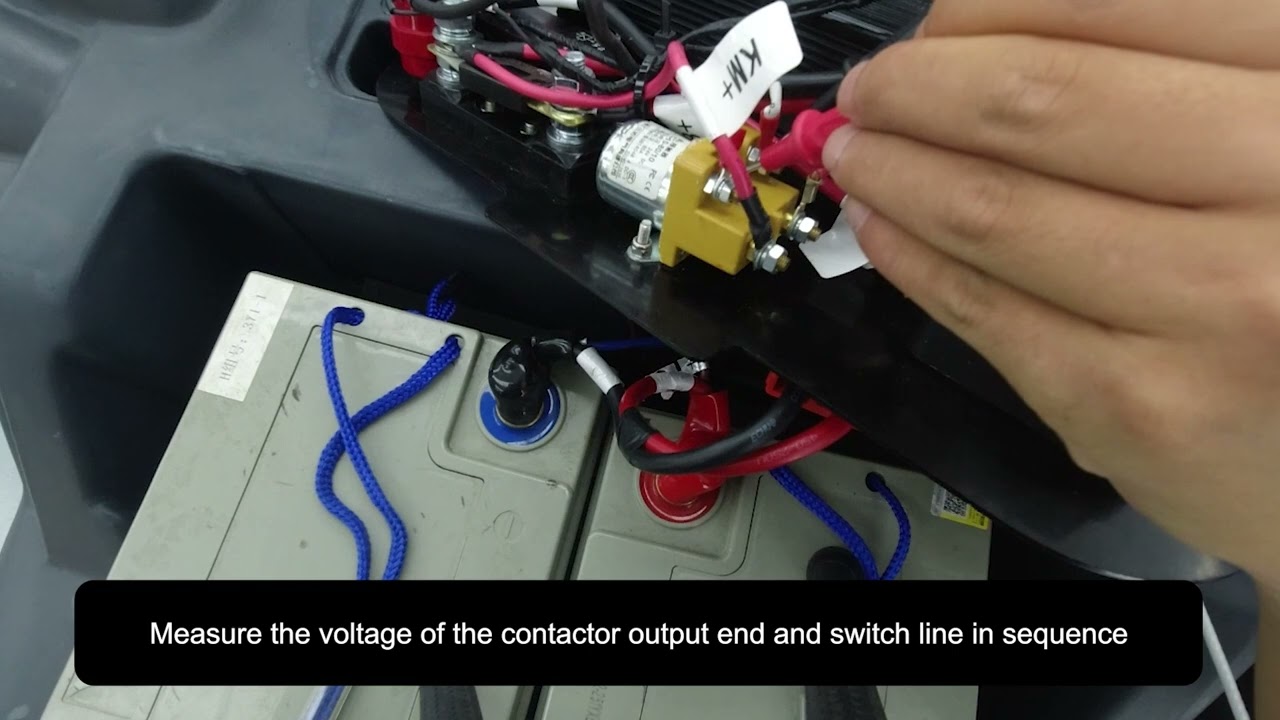
Locate the brush motor contactor. The terminal with the K+ marking is the input side, and the other terminal is the output side. With the key switch and brush function turned on, measure the voltage at the contactor input terminal. If there is no voltage at the input terminal, check the fuse in the circuit. If the fuse appears burned, blackened, or broken, replace it with the correct fuse. If the contactor input has voltage, measure the contactor output terminal. If the input has voltage but the output has no voltage, the contactor is likely damaged and should be replaced. If the contactor output has voltage but there is no voltage at the brush motor connector, continue checking the wiring between the contactor and brush motor.
If there is no voltage at the contactor input or the brush switch circuit, the brush micro switch should be checked. Use a 4 mm Allen wrench to remove the screws on both sides of the front cover of the machine head, then carefully remove the cover. Be careful not to pull or damage the wiring underneath. Check the wiring connected to the brush micro switch. If the wiring is loose, reconnect it. If it is damaged, replace the wiring. Then set the multimeter to continuity mode (beep mode). Turn the key switch OFF, lower the brush deck, and test the two terminals of the micro switch. If the micro switch does not show continuity when the brush deck is lowered, the micro switch is likely damaged and should be replaced.
Troubleshooting Videos for Other Models——Brush Not Spinning?
Select your machine model below to open the corresponding troubleshooting video. Troubleshooting procedures and component locations may vary by model.
Floor Scrubber Brush Not Spinning?
Frequently asked questions


Find More Answers in Our Support Center
Our Support Center includes helpful resources for many common floor scrubber questions, including:
-
Frequently asked questions
-
Operation and maintenance videos
-
Troubleshooting information
-
User manuals
-
Parts and accessories
-
Battery and charging guidance
-
Brush and pad questions
-
Warning lights and error messages
CONTACT SUPPORT
Still Having Trouble?
If your floor scrubber brush still isn’t spinning after completing these checks, our technical support team can help you determine the next step.
When contacting us, please have your machine model and serial number available.
Photos or a short video showing the brush area and the problem may help us diagnose the issue faster.
Contact us for technical support.
Call: 626-900-0778
Email: floorscrubberusa@gmail.com
Important Safety Reminder
Always turn off the machine and disconnect it from charging power before inspecting, cleaning, or replacing parts. Do not operate the vacuum system with the recovery tank open unless instructed by the support team for a specific diagnostic check.
